The admin dashboard is available to inform on the call center Key Performance Indicators at the organization level. Bonga Cloud employs leading, standard customer service KPIs in the industry as detailed below.
N.B. All statistics on the dashboard are for the current day only.
¶ Inbound Calls
The total number of successful calls made to the agents. This represents calls that were answered.
¶ Missed Calls
Refers to the calls that were not answered by call center agents. These calls could be a result of agents being unavailable or busy attending other calls. It is essential for call centers to track and minimize the number of missed calls to ensure customer satisfaction and timely resolution of queries.
¶ Abandoned Calls
These are instances of unanswered calls where the caller exited the queue before receiving assistance from any agent.
¶ Service Level Agreement
It is the agreement between the organization and its customers that defines the expected level of service. It specifies the number of calls answered within the service level threshold against the number of calls offered, as a percentage.
¶ Average Handling Time
Represents the average duration it takes for a call center agent to handle a customer interaction, including the time spent talking to the customer and performing any necessary post-call tasks (such as updating records or generating reports).
¶ Average Queue Time
Refers to the average amount of time a caller spends waiting in a queue before their call is answered by an available agent. It indicates the efficiency of call routing and staffing in the call center.
¶ Average Abandonment Rate
Refers to the percentage of callers who hang up or disconnect before reaching a live agent or having their call resolved. It represents the proportion of callers who abandon the call out of the total number of incoming calls. It reflects customer satisfaction, call center efficiency, and service level adherence.
¶ Occupancy Rate
It is a measure of how occupied call center agents are during a specific period. It is calculated by dividing the total handle time (talk time and after-call work) by the total logged-in time. Occupancy rate helps assess agent productivity and workload management. A higher occupancy rate indicates agents are actively engaged, but it's important to maintain a balanced occupancy to avoid burnout and maintain service quality.
¶ Adherence Rate
This measures the extent to which call center agents adhere to their scheduled work time, including their start time, breaks, and end time; expressed as a percentage. Monitoring adherence rate helps identify potential attendance or schedule adherence issues, allowing call centers to take corrective actions and optimize resource allocation.
¶ Queue Calls
Connected – refers to the total number of active calls where callers are currently being attended to by an agent within the relevant queue.
On Queue - The number of currently pending calls in the said queue, waiting to be connected to the next available agent.
On IVR – These are callers who are currently being served by the incoming Interactive Voice Response (IVR) system. They are yet to be connected to an appropriate queue for further assistance.
¶ Active Agents
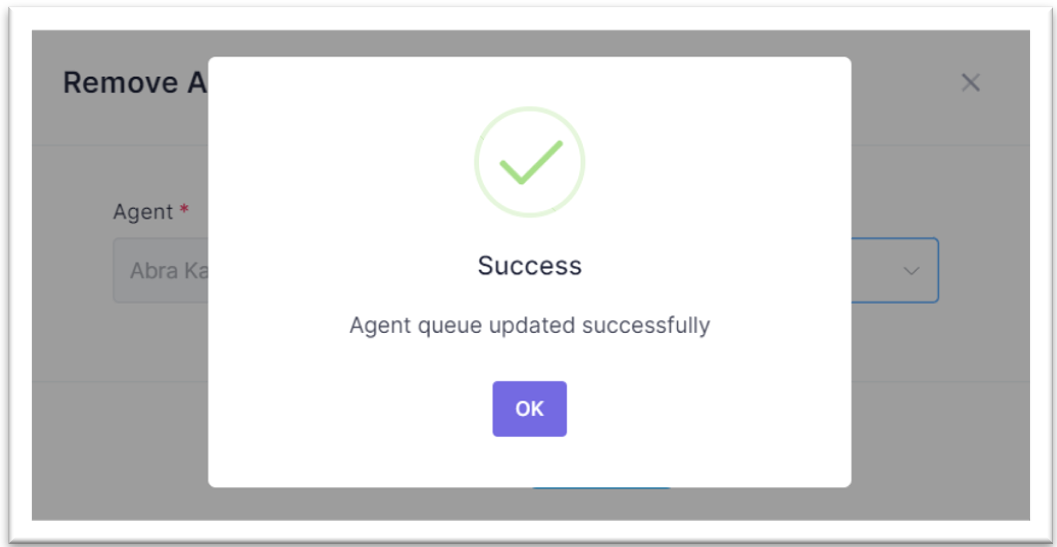
As an administrator, you can effortlessly track your agents' status, identifying whether they're on a call, on a break, or engaged in other tasks. Moreover, you gain insight into their extensions, potentially impacting their capacity to handle crucial inbound and outbound customer calls. Further agent actions are available to manipulate the agent states e.g. change queue.
To change the agent’s state:
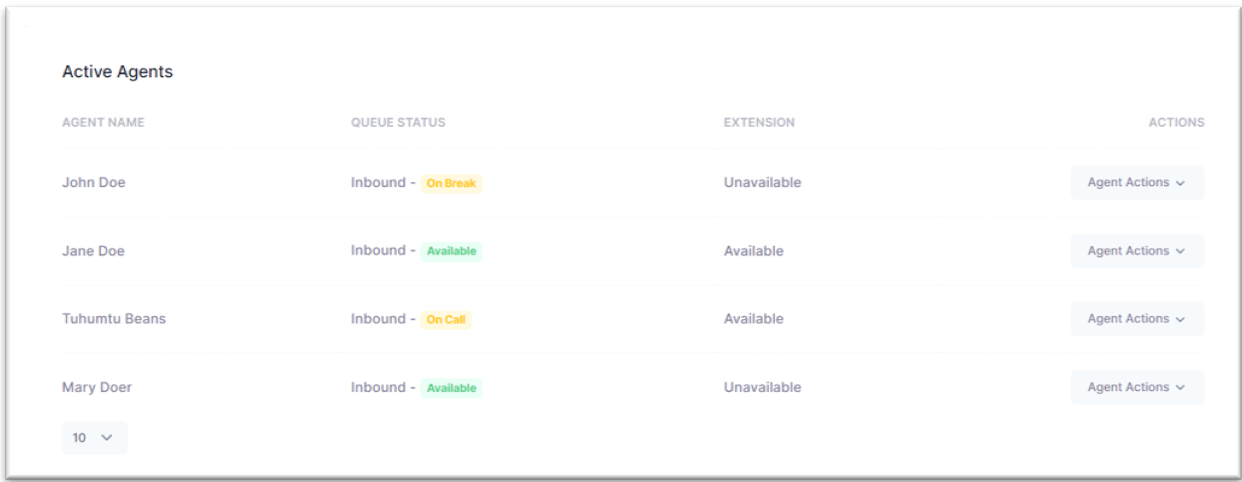
Step 1: Navigate to Agent Actions and choose the appropriate option from Remove From Queue or Assign To Queue. The corresponding queue names for the selected agent will be displayed.
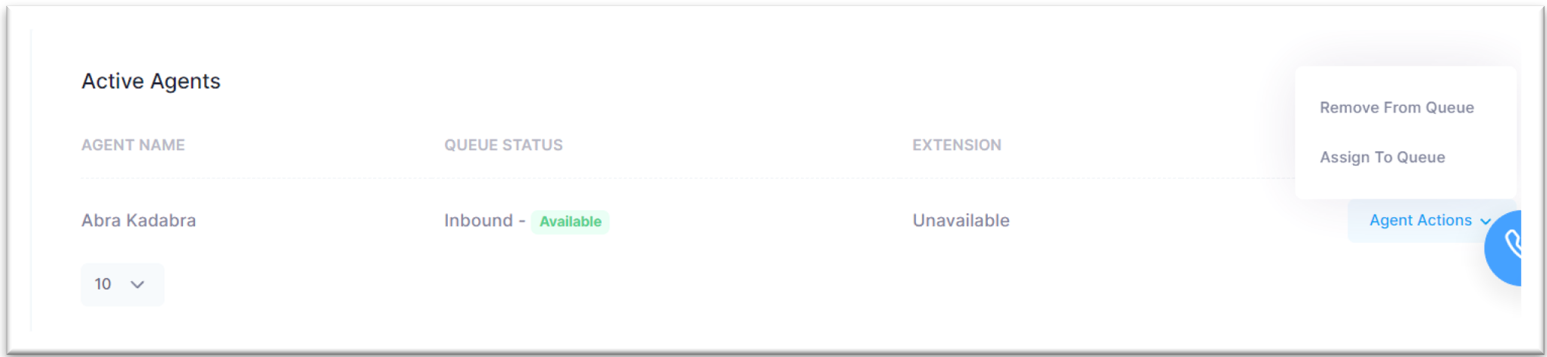
Step 2: Click Agent Actions and choose the appropriate option, either Remove From Queue or "Assign." Select the relevant queue for moving or removing the agent accordingly.
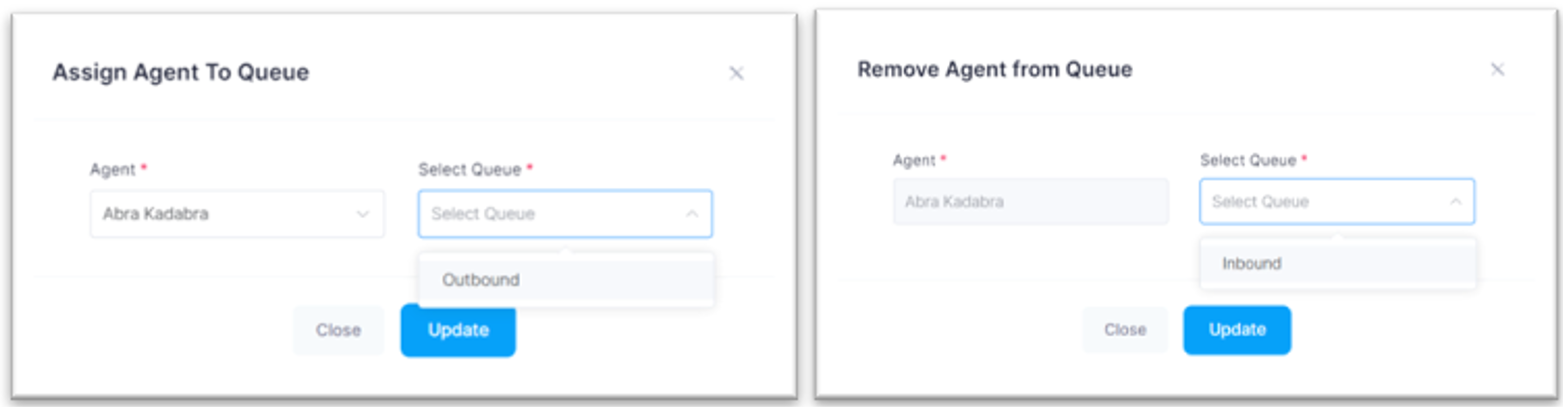
Step 3: Click on the Update button to save your new agent’s state. On success, you will be received by the pop up below. Click OK to dismiss it.